Real processes, connected from action to evidence.
Workflows control how records move. Reporting shows what those records say. Configuration makes both reflect your operating model—without splitting the audit trail across separate tools.
Use cases
What teams do with the platform.
01 · Document workflow
Route an MBR from draft to release.
Give the Master Batch Record its own reviewers, approval chain, required metadata, and release path. When a new version supersedes it, the previous version stays retrievable and every decision remains attributable.
The current released version is clear without reconstructing an email trail.
Raise the deviation inside the engineering run, link the affected task and exact document version, route it through investigation and QA review, then connect the resulting CAPA without losing context.
The event, evidence, decision, and corrective action stay on one traceable thread.
Roll milestones, overdue actions, open quality events, document status, and ownership across concurrent transfers. Because reporting reads the operating records, teams do not reconcile a separate status tracker first.
Sponsor and CDMO teams see current status from the same governed source.
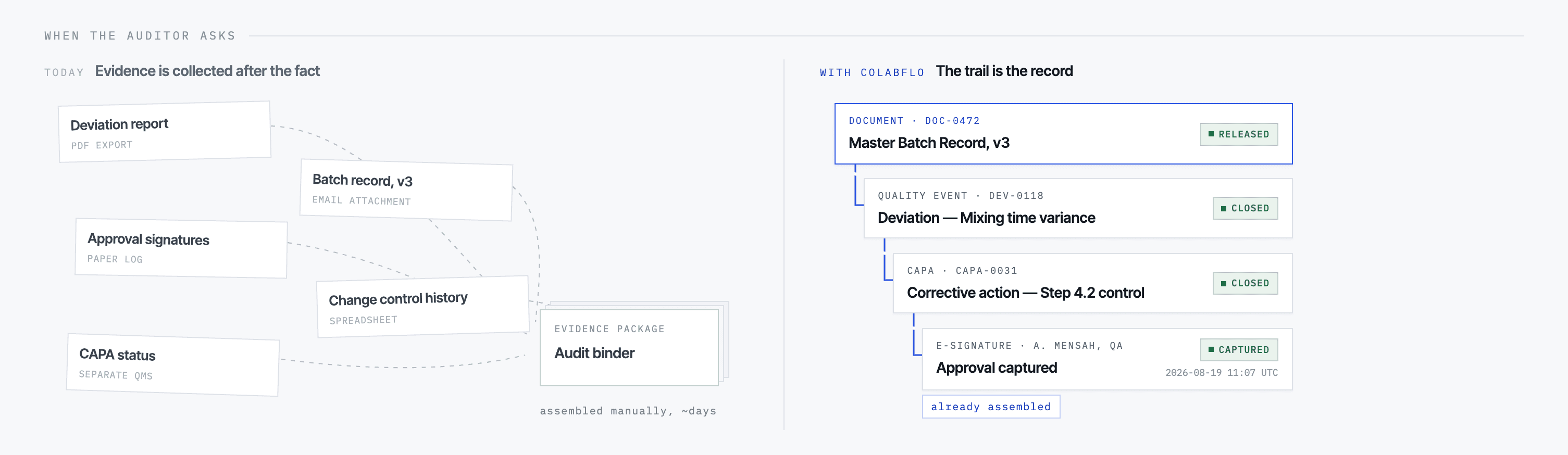
Move from a cycle-time or open-event view to the project, task, document version, approval, deviation, or CAPA that produced it. Assemble the connected records into an evidence package when review begins.
Reporting and audit evidence stay aligned because they consume the same objects.
Administrators define record types, fields, terminology, numbering, lifecycle states, transition rules, and approval paths for the way each organization works.
Your controlled process is configured in the platform rather than forced into a generic template.
Scope sponsor and CDMO users by organization, role, program, and object type. Apply the same permission model to projects, documents, quality records, reporting, and workflow actions.
External partners collaborate in the record without shared credentials or uncontrolled exports.